Hello, I am sumit and currently pursing my final year of graduation with IT stream from JSPM BSIOTR Wagholi Pune. I am currently learning DevOps with TrainWIthShubham. I have prior knowledge of Java, JSP, Servlet, SQL and Data structure also.I am a hard worker, smart and quick learner.
Docker Compose:
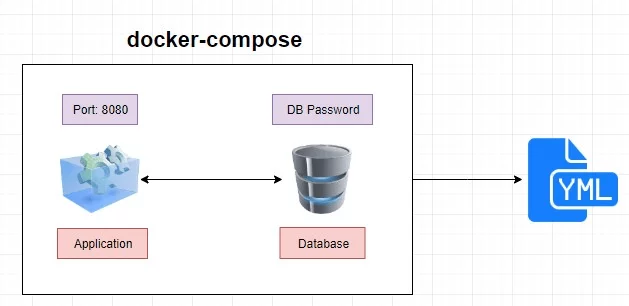
Docker Compose is a tool for defining and running multi-container Docker applications. It allows you to define a multi-container Docker application in a single file, usually named docker-compose.yml. With Docker Compose, you can specify the services, networks, and volumes required for your application, making it easy to manage and deploy complex applications with multiple components.
Here are some key concepts and features of Docker Compose:
Services: A service is a containerized application component defined in the
docker-compose.ymlfile. Each service specifies a Docker image, along with configuration options such as ports, volumes, environment variables, etc.Example
docker-compose.ymlsnippet:yamlCopy codeversion: '3' services: web: image: nginx:latest ports: - "8080:80"Volumes: Volumes allow you to persist data generated by and used by Docker containers. You can specify volumes in the
docker-compose.ymlfile to ensure that data is not lost when containers are stopped or removed.Example volume definition:
 yamlCopy codeversion: '3'
 services:
   app:
     image: myapp:latest
     volumes:
       - data-volume:/app/data
 volumes:
   data-volume:
Networks: Docker Compose allows you to define custom networks for your services. This helps in controlling how containers can communicate with each other.
Example network definition:
 yamlCopy codeversion: '3'
 services:
   app1:
     image: myapp1:latest
     networks:
       - mynetwork
   app2:
     image: myapp2:latest
     networks:
       - mynetwork
 networks:
   mynetwork:
Environment Variables: You can set environment variables for your services in the
docker-compose.ymlfile. This allows you to customize the behavior of your containers without modifying the container image.Example environment variable setting:
 yamlCopy codeversion: '3'
 services:
   app:
     image: myapp:latest
     environment:
       - DATABASE_URL=mydatabase://user:password@db:5432/mydb
Command Line Usage:
To start a Docker Compose application:
docker-compose upTo stop a running Docker Compose application:
docker-compose downTo view logs of services:
docker-compose logs
Docker Compose simplifies the process of managing and orchestrating multi-container Docker applications, making it easier to develop, test, and deploy complex applications.
What is YAML?
YAML, which stands for "YAML Ain't Markup Language" or sometimes "Yet Another Markup Language," is a human-readable data serialization format. It is often used for configuration files and data exchange between languages with different data structures. YAML is frequently used in conjunction with configuration files for various software applications.
Key features of YAML include:
Human Readable: YAML is designed to be easily readable by both humans and machines. It uses indentation to represent the structure of data, which makes it visually clear.
Indentation: Unlike many other programming languages or data serialization formats that use braces or brackets for structuring, YAML relies on indentation to define the hierarchy and nesting of elements. This can make YAML files more readable, but it also requires careful attention to indentation levels.
Data Types: YAML supports various data types, including scalars (strings, numbers, etc.), sequences (arrays/lists), and mappings (key-value pairs). This flexibility makes it suitable for representing complex data structures.
Comments: YAML allows comments, which are preceded by the hash symbol (
#). Comments can be used to provide additional information or explanations within the YAML file.No Special Characters: YAML avoids using special characters like braces
{}, brackets[], or semicolons;, making it simpler to read and write compared to some other data serialization formats.Extensibility: YAML is extensible and can be used for a variety of purposes. It is commonly used for configuration files, but it can also be used for data exchange between languages and tools.
Here is a simple example of a YAML file:
yamlCopy code# Sample YAML configuration file
server:
  port: 8080
  host: localhost

database:
  name: mydatabase
  user: myuser
  password: mypassword
In this example, the YAML file represents configuration settings for a server and a database. The indentation indicates the hierarchy, and key-value pairs are used to define configuration parameters.
Many software tools and platforms, including Docker Compose, Kubernetes, and various programming languages, use YAML for configuration files due to its simplicity and human readability.


