Hello, I am sumit and currently pursing my final year of graduation with IT stream from JSPM BSIOTR Wagholi Pune. I am currently learning DevOps with TrainWIthShubham. I have prior knowledge of Java, JSP, Servlet, SQL and Data structure also.I am a hard worker, smart and quick learner.
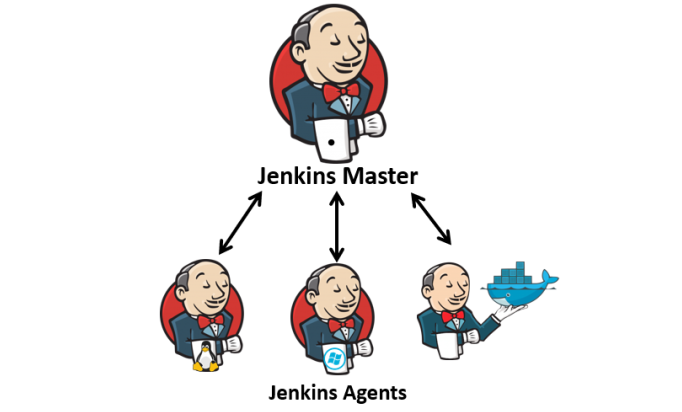
In Jenkins, agents (also known as nodes) are machines that are set up to offload the build and execution of jobs from the Jenkins master server. Agents can be physical machines or virtual machines that run the Jenkins agent software and are connected to the Jenkins master.
Here are key points about Jenkins agents:
Agent Types:
Master: The Jenkins master is the central server that manages job scheduling, builds, and serves the Jenkins web interface. It can also act as an agent, but it is generally recommended to use dedicated agents to distribute the load.
Static Agents: These are agents that are configured manually and are always available to run jobs. They can be useful when there is a dedicated set of machines for specific types of builds or tests.
Dynamic Agents: Dynamic agents are launched on-demand and automatically by the Jenkins master to handle workload spikes. Docker containers are often used for dynamic agents to provide isolated and reproducible build environments.
Agent Configuration:
- Agents must be configured in Jenkins to establish a connection between the master and the agent. This configuration includes specifying the agent's name, labels (used for job assignment), and connection details.
Launching Agents:
- Agents can be launched in various ways, such as through SSH, JNLP (Java Network Launch Protocol), or by using agent-specific launchers like Docker. Agents can be launched manually or automatically by the master when a job requires additional capacity.
Node/Agent Labels:
- Agents can be assigned labels to categorize them based on capabilities or characteristics. For example, an agent with the label "Linux" may be used for jobs that specifically require a Linux environment.
Agent Status:
- Jenkins master monitors the status of agents, indicating whether they are online, offline, or idle. This information helps Jenkins decide which agents to use for running jobs.
Agent Workspaces:
- Each agent has its own workspace where it stores files related to the jobs it runs. Workspaces provide isolation between different builds and ensure that jobs do not interfere with each other.
Agent Availability:
- Agents can be configured to be online (available for jobs) or offline (unavailable for jobs). This allows administrators to take agents offline for maintenance or updates.
Agent Security:
- Security measures must be considered when configuring agents, especially for agents running on external machines. Authentication and authorization settings ensure that only authorized agents can connect to the Jenkins master.
Agent Logs:
- Agents generate logs that can be useful for troubleshooting. These logs provide information about the agent's activity, connectivity, and any issues encountered during job execution.
Agent Plugins:
- Jenkins supports various plugins that enhance agent capabilities. For example, plugins may provide integration with cloud providers for dynamic agent provisioning or offer specific tools for build environments.
Jenkins agents play a crucial role in enabling distributed builds, improving scalability, and providing flexibility in managing build environments. They allow organizations to efficiently utilize resources and accelerate the continuous integration and delivery processes.
Jenkins Master (Server):
The Jenkins master, also known as the Jenkins server, is the central component of a Jenkins continuous integration (CI) and continuous delivery (CD) system. It is responsible for managing and coordinating the automation of build, test, and deployment processes. The master interacts with one or more Jenkins agents (nodes) to distribute the workload and execute jobs in a distributed manner.
Here are key characteristics and responsibilities of the Jenkins master:
Job Scheduling:
- The Jenkins master schedules and manages the execution of jobs (also known as builds) based on triggers, such as code commits, scheduled intervals, or manual initiation.
User Interface:
- The Jenkins master provides a web-based user interface accessible through a web browser. The web interface allows users to configure jobs, view build results, and manage Jenkins settings.
Job Configuration:
- Users configure jobs on the Jenkins master, specifying details such as source code repositories, build scripts, testing procedures, and deployment steps. Jobs are defined using either Freestyle projects or Declarative Pipeline scripts.
Plugin Management:
- Jenkins supports a vast ecosystem of plugins that extend its functionality. The master is responsible for managing and installing these plugins, enabling integration with version control systems, build tools, testing frameworks, and various other tools.
Build Environment:
- The master manages the overall build environment, including global configuration settings, security configurations, and system-wide settings. This ensures consistency and proper functioning across all jobs.
Distributed Builds:
- While the master can execute builds on its own, Jenkins supports the concept of distributed builds. The master can delegate the execution of jobs to one or more agents (nodes) to distribute the workload, allowing for parallel and concurrent execution.
Job Monitoring:
- The master monitors the progress of ongoing builds and keeps track of build results. It provides real-time updates on build status, logs, and test results through the web interface.
Security:
- Jenkins master enforces security measures, including user authentication, authorization, and access control. It ensures that only authorized users have access to Jenkins and its functionalities.
Artifact Storage:
- Jenkins can store build artifacts, which are the output files generated during the build process. Artifacts can be archived on the master or published to external repositories.
Integration with Version Control:
- Jenkins integrates with various version control systems (e.g., Git, Subversion) to automatically trigger builds based on code commits. The master manages these integrations and fetches the latest code for each build.
Logging and Auditing:
- The master generates logs that capture information about job executions, build results, and any issues encountered. These logs are valuable for troubleshooting, auditing, and analysis.
Scalability:
- Jenkins masters can be scaled horizontally to handle larger workloads by setting up multiple master instances in a master/slave configuration or using Jenkins in a distributed environment.


